Claude Code token cost explorer

I am experimenting with involving subagents more in my llm coding agent
workflow. I discovered that subagents make it more difficult to diagnose token
usage in Claude Code1 Technically the same thing is true of Pi, but I haven’t
had the same cost issues in Pi yet. I’ll write more about Pi, Emacs Agent Shell,
open weight models, and privacy-friendly inference providers some other time.,
because the regular /context command only breaks down context usage for the
main conversation, not for the subagents.
I tried some existing tools like ccusage and claude-agent-ledger, but they
weren’t able to give me the sort of breakdown into specifics I needed to
optimise my usage. Thus, I shamelessly had Claude Code whip up a tool that gives
me a better view of its token usage. This is vibecoded in the true sense of the
word – I have barely looked at the code – but I’m okay with that becuase it is
not critical infrastructure and it does what I need it to.2 Besides, I’m sure
Anthropic will change the format of the jsonl session transcripts not long
from now anyway, which makes all of this moot. There’s no point in spending too
much time on it. The upside is that it took only about 30 minutes to make from
start to finish including a small bit of UI polish, so it should be easy to
recreate.
If you want to know how to get more out of your Claude Code sessions without paying more for it, here’s how you can find out.
How to use the context cost explorer
First, open the context cost explorer in your browser. Everything happens locally on your machine, so none of your transcript data leaves your computer. If you’re the paranoid kind, you can verify by opening the network tab in your browser and reading in a non-sensitive session and seeing that nothing funny happens.3 Though I suppose if you’re the paranoid kind, you did that already without needing the suggestion. Then follow the steps below, or use your own analytical ability.
Load in a project and select a session
We begin by asking it to read in a session we want to diagnose.4 Firefox issues a scary warning when you let your browser read your files like that, but again, nothing gets sent off the page. We can also tell it to read in an entire Claude Code project directory, in which case it will auto-discover all sessions and let us select one.5 Why not aggregate over sessions the way aggregation happens over sessions? No good reason. I just didn’t have a demand for that.
The list of sessions will look like in this image, except without the redacted details.
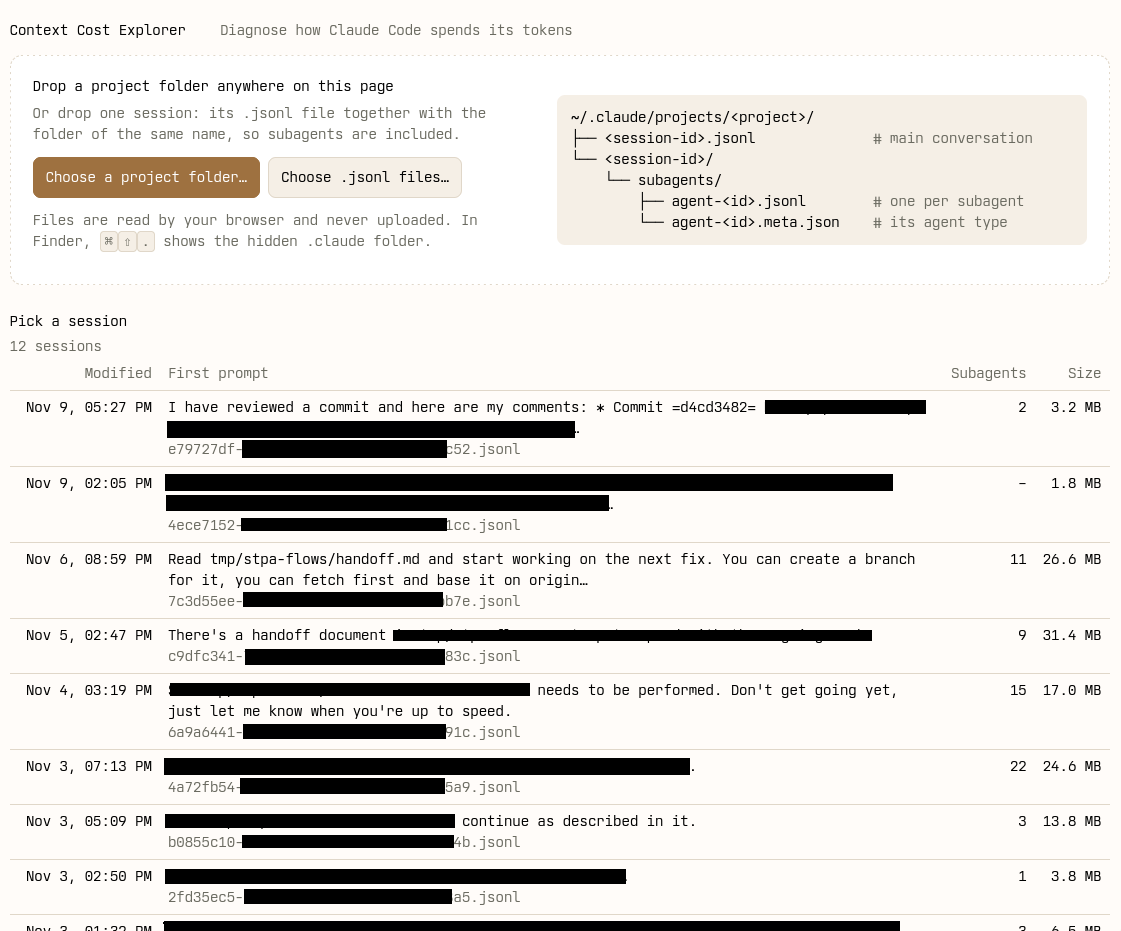
In this case, we might be curious about the session from November 6th, the 26.6 mb one. We click it.
Look at session overview
We are presented with an overview of the cost for that session.
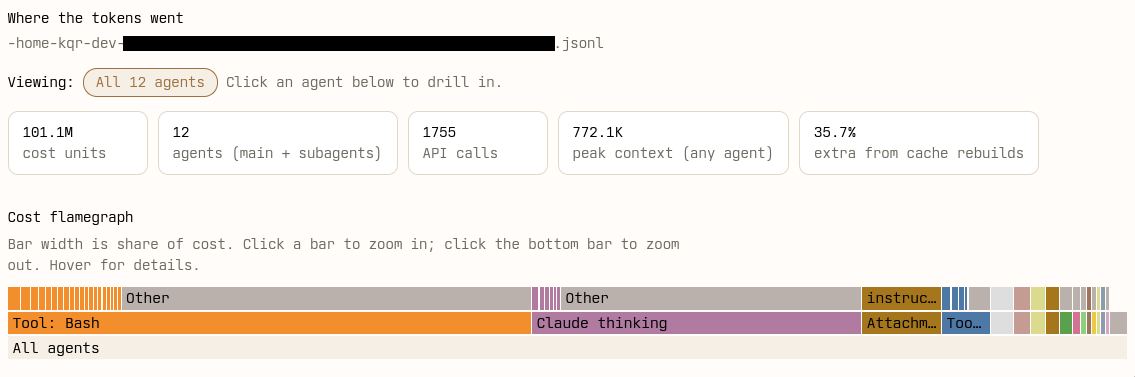
I have to admit I gloss over the numbers at the top because I don’t quite understand their significance. Although 36 % extra cost due to cache rebuilds sounds like a lot, prompt caching is something I haven’t read about so I can’t make heads or tails of it. The flame graph, though, is great for getting a rough picture of where resources are spent.6 Flame graphs are definitely underrated and should be used more widely, also outside of software performance optimisation circles. Thanks, Brendan Gregg, for inventing them!
The flame graph alone makes some things obvious already, but we’ll continue to explore and look at a more dynamic view of cost first, to see how it all fits together.
Get a per-agent breakdown
If we scroll down a tiny bit, we get to a summary of cumulative token usage for that session, counting both the main conversation and any subagents involved. Darker shades in the plot indicate time periods where the corresponding agent contributed more to the cost of the session, relative to the total activity at that time.
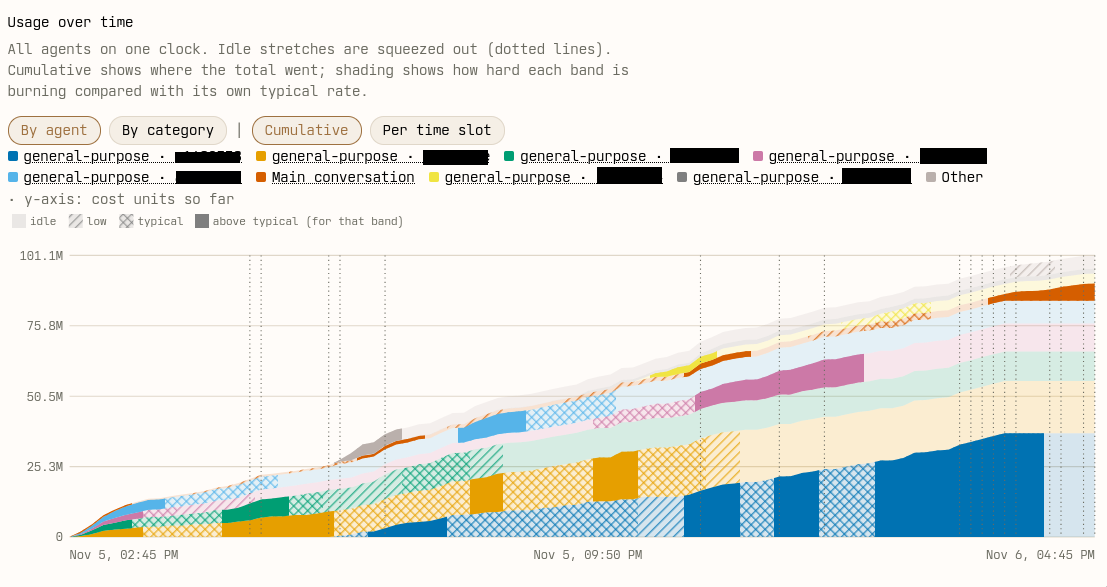
We can see here that the blue subagent was one of the most expensive ones, followed by orange. In this article, we’ll look more into the green one. It seems like most of green’s activity happened early, and then it became idle at around 9 pm. Let’s find out more.
Select a (sub)agent of interest
Below the plot, there’s a table of agents, where we can expand the initial instruction each received, either from the human (in the main conversation) or from the orchestrating agent (in the case of subagents).
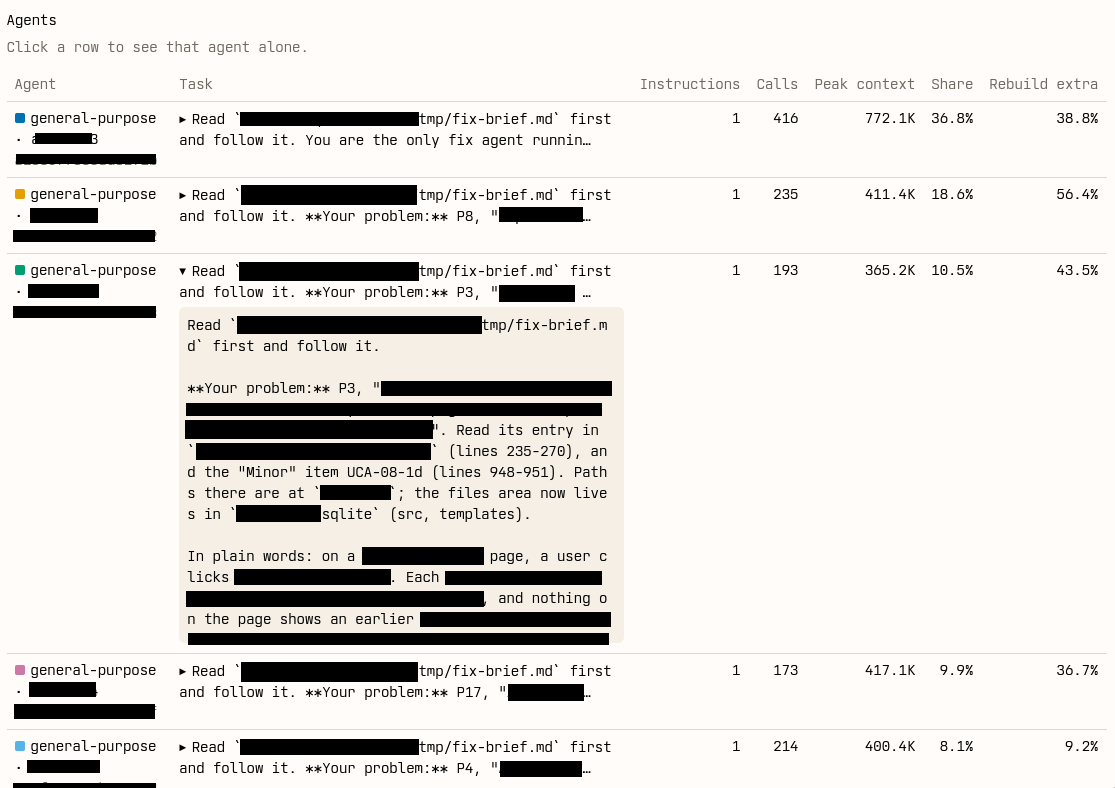
We click the row of the agent we want to explore the details for.
Break down cost by token type
When we do, we get taken to a cumulative cost plot, broken broken down by the kinds of tokens there are in the conversation with that subagent. This confirms that this subagent was spun down at around 9 pm that night, since the plot extends to that time.
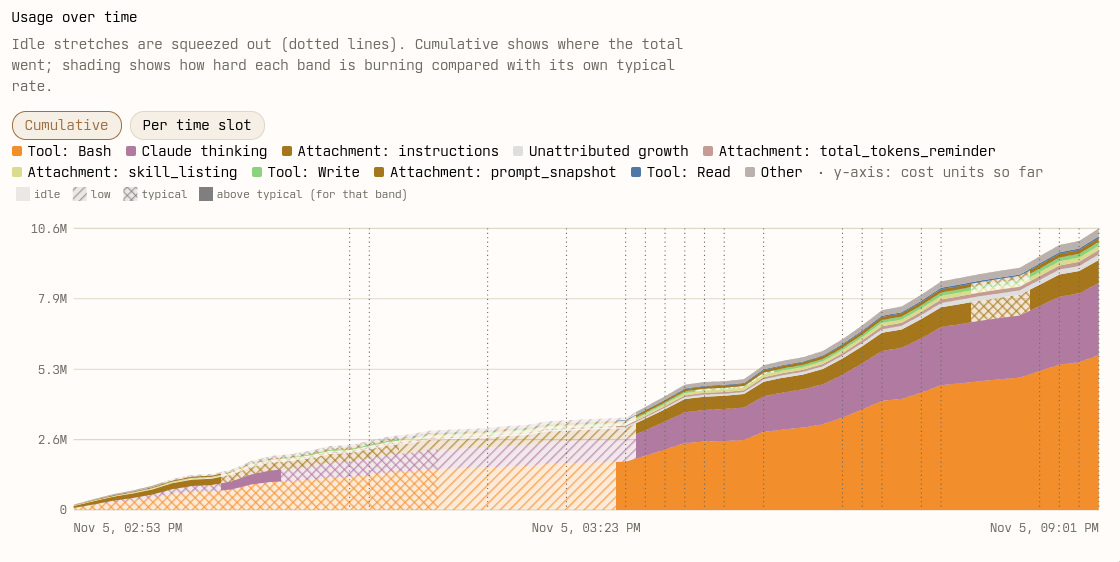
Most of the cost (solid shading) was incurred at the end of this agent’s timeline. That’s usually the case, because the context gets more expensive when more stuff is added to it, so over time each turn gets more and more expensive as the context grows.7 Unless I’m mistaken, the cost of a conversation grows quadratically with the number of turns. One of the few ways the context window can shrink is through compaction. To see if compaction happened, we scroll down to the turn-by-turn context usage plot.
View context usage turn-by-turn
This plot shows, at each turn of the conversation, the actual size of the context window usage in number of tokens. Unlike the cumulative cost plots, this number can shrink, e.g. when compaction happens.
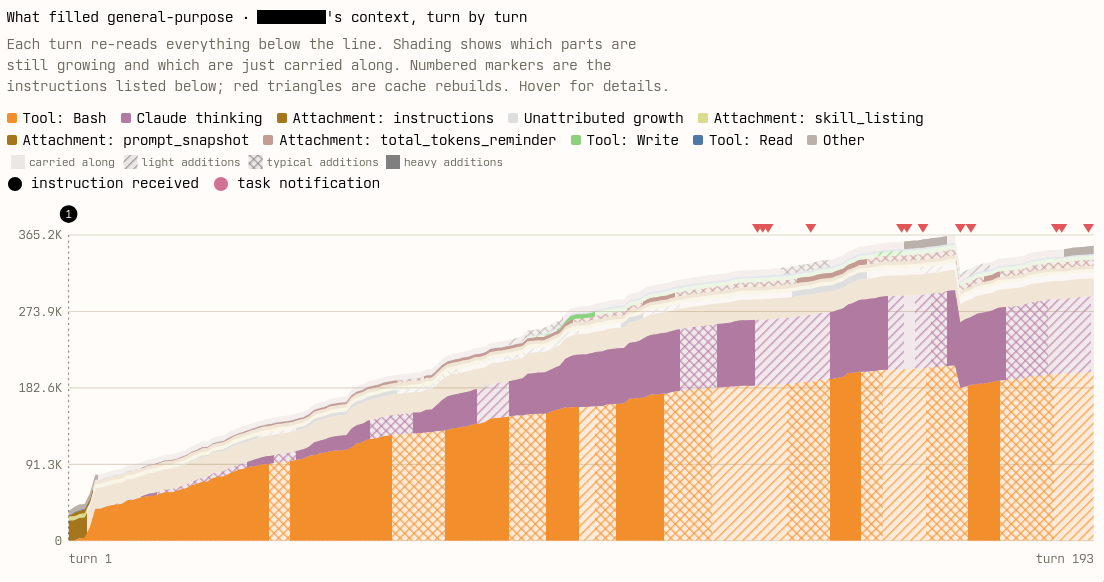
Taken together, these two plots show a typical pattern of conversation cost in these systems: even though token usage increases most early on (this plot), the cumulative cost increases most toward the end of the conversation (previous plot).
We see here that the Bash tool call is hands-down the largest producer of
tokens in this conversation. In particular, Bash produces a lot of tokens
early in the conversation, and early tokens are the more expensive tokens
since they add to the cost of all subsequent turns. We might be curious why Bash
is so expensive, so we scroll down a bit more.
Address the top-40 cost items
Further down we find a list of the top 40 most expensive individual things in the context. This shows which specific entries in the context drive token usage and costs over the course of this conversation.8 Tool calls are summarised in this screenshot, but they can be expanded to see more details on exactly what command was run, and what its output was, for example.
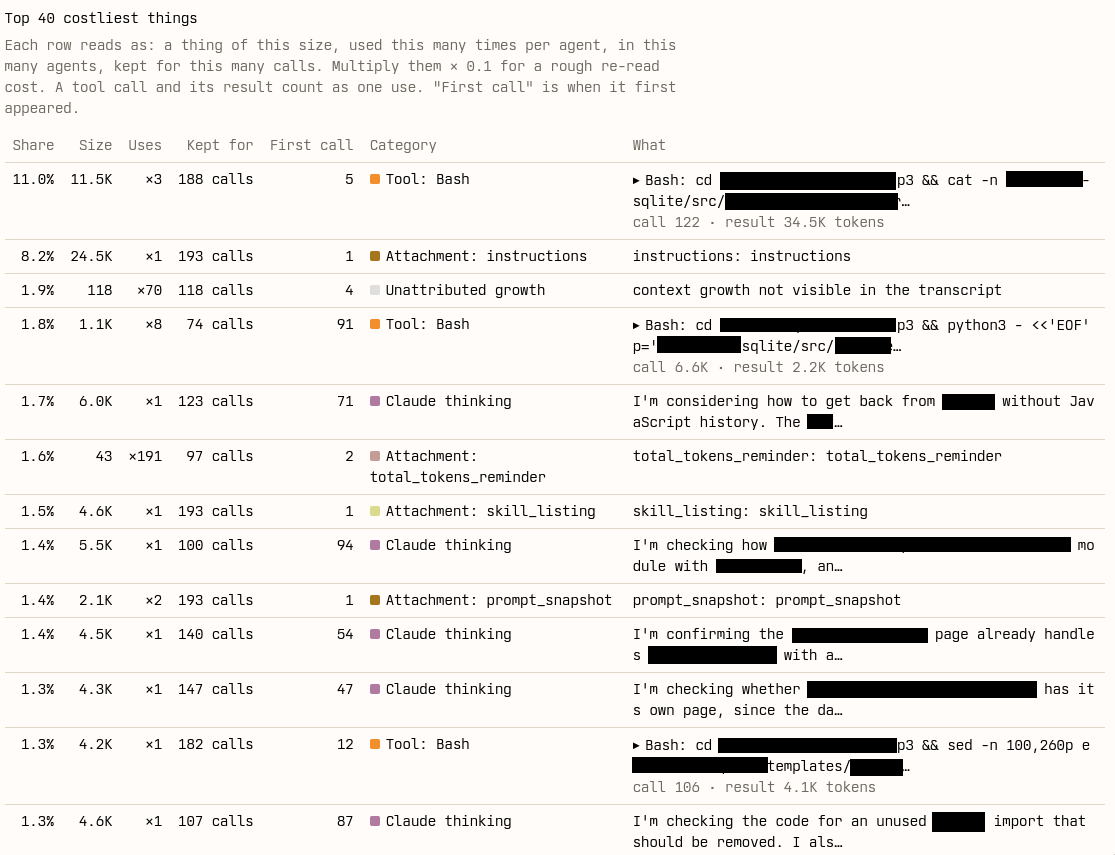
There are several things of interest we can learn from this table.
- The initial instruction block in Claude Code tends to be quite big. In this case, it requires nearly 25,000 tokens (“Size”). It was only written into the context window once (“Uses”), but it was kept in the context for the entire conversation of 193 turns (“Kept for”). Cumulatively, that ends up being 8.2 % of the cost of this subagent’s conversation.
- Some of the expensive
Bashtool calls are similar: they usecat -nto read in entire source files early in the conversation (happened in turns 5 and 12 respectively, as seen in the “First call” column) and then those full source files are kept around in the context for the rest of the conversation, which is expensive.9 Stripping them out of later turns it not obviously a net benefit though, because prompt caching is complicated. - There’s another
Bashcall which is slightly cheaper, and didn’t happen until later in this subagent’s conversation (turn 91), but it’s then repeated eight times (“Uses”) and each call is on average kept for 74 turns (“Kept for”), so it ends up being expensive in aggregate anyway. - The thinking blocks happen only once, but some of them produce enough tokens (4,600–6,000 in the “Size” column) that they end up in this list anyway. This will overwhelmingly be the early ones, because they’re kept in the conversation for many turns.10 The harness is not allowed to discard thinking blocks. I learned when making my own ultra-simple harness loop that Anthropic requires re-sending thinking blocks in order for tool calls to work, or something along those lines.
- Apparently Claude Code also sends a token count reminder with every turn. It’s tiny at just 43 tokens, but happening at every turn and kept for the full conversation it accumulates and becomes 1.6 % of the cost!
This gives us some ideas for how to make inference cheaper and reduce our plan
usage: reduce the size of initial instructions, figure out how to get Claude to
not read full source files11 This one I’m most nervous about. Adding more
instructions is obviously not the solution if we wanted to reduce the size of
the instructions. Maybe intercept calls like Bash(cat -n *) and Read(*) and
return truncated output, instructing the model to issue more specific reads?,
compact subagent conversations more aggressively12 As I understand it, there
are ways to get Claude Code to do this automatically., reduce the scope of
changes expected of subagents, etc. Most of this is common sense among
practitioners, but now we have the data to prove it – and verify whether it
worked.
Check the most expensive across all agents
I should say that the context cost explorer also lets us see a cumulative
picture of what the most expensive types of tokens are across all agents in a
session. In my example, that list mirrors the per-agent case: Bash calls most
expensive, followed by reasoning tokens, then the Read tool.
However, if we look at the most expensive individual items across all agents, we find the initial instruction block at the top, contributing 7 % to the cost of the session.
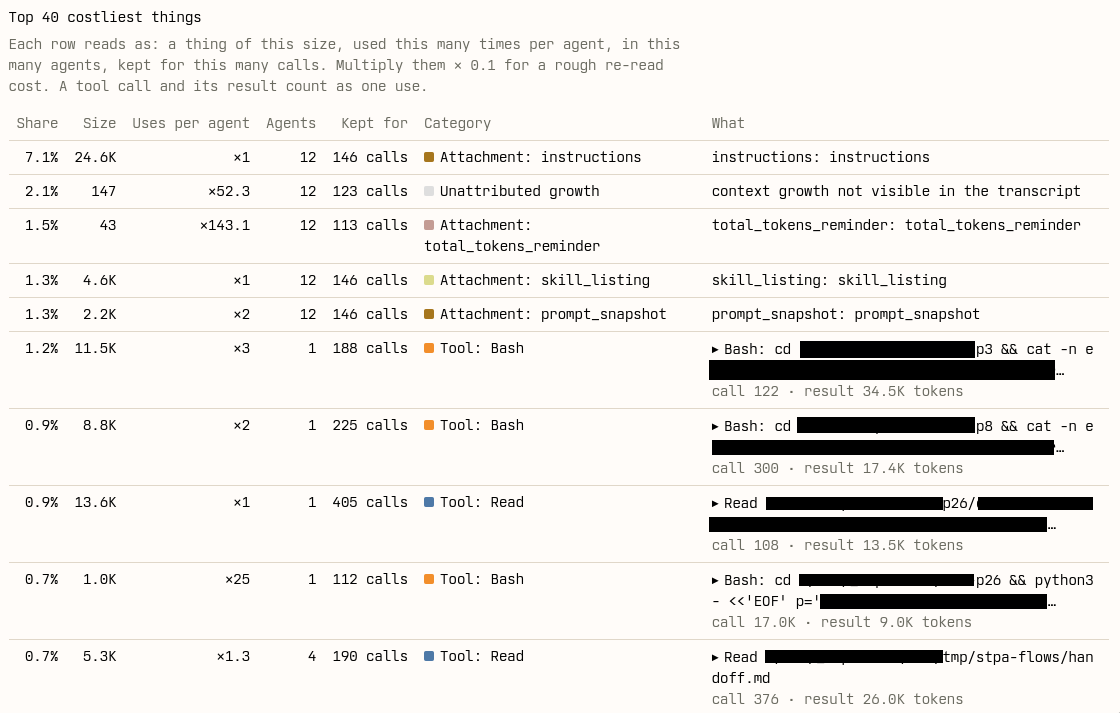
The reason instructions ended up most expensive, when each
individual agent has a Bash call as its most expensive token type, is that all
agents share the same initial instruction block, but they issue slightly
different expensive Bash calls. Thus, we need both the cross-agent view and
the per-agent view to optimise this rationally. The cross-agent view tells us of
the items that may be individually small, but which contribute a lot of cost due
to their wide inclusion in many subagents. The per-agent view tells us which
task-dependent items drive the usage of each agent.
Getting used to my new job
This has been such a weird thing to do! I wouldn’t have guessed a few years ago that a part of the software engineering discipline would be spending time digging into and optimising the economics of context usage of language models. But the world is changing, and we have to learn new things to change with it.