A curmudgeon tries a language server

I write code roughly the same way I did ten years ago1 Well, this was true when I started drafting this article. I have since adopted robots to do much more of the actual typing of code, unless it’s a project where (a) I care about code quality, or (b) I try to learn something.: I make edits in my text editor, I switch over to a terminal window and I run a command to compile and execute the code. I look at the result, then switch back to my editor. If I am unsure of what happens, I either add tracer prints to the code and restart the program, or I restart the program in a debugger. If I hit an exception that crashes my program, I fix the problem and then restart it.
I’m envious of what Lisp programmers do. Lisp development typically happens by typing code directly into the repl to add, remove, and replace parts of the live, running system.2 In practice a Lisp programmer would probably type the code into a scratch pad in their editor and then send it to the repl, but it is as though they typed it directly into the repl.
- A Lisp programmer does not need to “switch over” to something else because they are already inside their program process.
- They never “compile and execute” the code because the code is already running and they edit it by hot-swapping code.
- They never restart in a debugger because they are already inside their program process and can inspect anything they want.
- They don’t have to restart the program on exceptions, because the condition system allows resuming the crashing code from anywhere in the stack after the system has been patched with a fix.
A consequence of this way of working is that early in a Lisp project, there may not even be any source code to speak of. Instead, the evolving definition of the system exists only in the memory image of the running process and nowhere else. This is so unlike how we normally do development that people have expressed trouble understanding what that even means. A comparison that might help is to think of how people treat relational databases in the beginning of a project. Often, people don’t start out with a version-controlled schema definition; rather, the evolving schema exists only in the running database. Sure, at some point when the project matures, the database schema is dumped out to a file, put under version control, and from that point forward, schema changes are made through explicit migrations. Similarly, a Common Lisp project that matures will be dumped from memory image to source code eventually, and then that source code will go under version control, with patches applied more carefully to the live system.
But in the early stages? Oh, it’s all evolving live.
I’m not a Lisp developer, so I won’t ever get that experience. I’ll stay envious. But I also realised I haven’t really tried to get closer to it. Maybe there are some improvements I can get even in my working language of Haskell.
What can we do in Haskell?
There are some things we can rule out immediately, and others that seem like partial wins with not too much effort.
- There’s no way to write Haskell that puts us inside the program process, so we will still need to restart in a debugger.
- Although I’m sure it’s possible to implement a Lisp-like condition system in
Haskell, the types of exceptions (
EitherTand async exceptions) used in common libraries don’t have one. On the flip side, fewer things in Haskell lead to exceptions thanks to the powerful type system. That’s a partial win without lifting a finger. - For a couple of years, there has been a Haskell language server, an lsp implementation for Haskell. These days, Emacs has built-in support for speaking lsp through the built-in Eglot client. This seems like another cheap partial win to get higher-quality code introspection than I’m used to.
- Then there is a project called ghcid that watches for changes to Haskell source files and immediately recompiles things that have changed. That alone doesn’t give us much beyond what hls already does, but ghcid can also run a function once the code has compiled successfully. That is powerful, because it can be combined with the foreign-store library (or the higher level Rapid library) to maintain process state even when all the code is replaced!
Thus, where a Lisp programmer would incrementally send definitions over to the repl, we use the combination of ghcid and foreign-store to automatically recompile and restart our entire program without losing important state. For many classes of software, these two approaches should lead to similar workflows.
The one thing we still cannot do is evaluate code in the repl of the running program – because ghcid doesn’t support it. However, I mostly do this to test that functions work as intended, so what we can do instead is write that code as an actual unit test case, and have ghcid also run tests when it reloads the code.
We end up with a process where we still write code in our editor, with the lsp server giving us information about our code. Instead of playing around in the repl to try things out, we write our experiments as unit tests. When we save our changes (tests or application logic), ghcid reloads the code, runs the tests, and restarts the application in a way that doesn’t lose important state. We never leave our editor. It’s neat on paper, but I wasn’t sure how it’d work in practice, so I tried it with a toy project.
The toy project
At the time of writing this, I was trying to patch up my lack of skill with differential equations and non-linear dynamics. The book I was reading3 Differential Equations; Blanchard, Devaney, Hall; Cengage Learning; 2011 has a pleasant focus on computational methods4 Traditional first classes in differential equations – including the one I took many years ago – had a heavy analytic focus out of necessity. In practice in the industry, differential equations are solved computationally because in many cases calculus is not sufficient to solve them any other way., and the book comes with software for performing the exercises, but I want to write the code on my own.
At least in the early chapters, the software is not exactly rocket surgery. Here’s an example of my program producing a slope field in light grey to visualise the general solution to a differential equation, and then in black the specific solution that passes through the coordinate under the cursor.
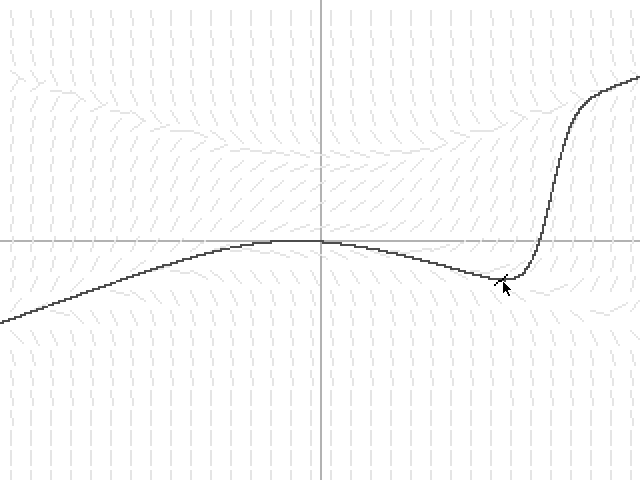
When exploring ideas from the book, I want to write some code, write some tests, and then when I save, the window containing the visualisation should automatically update to reflect the latest changes. It’s not exactly a Lisp development flow, but contains some of its good parts; specifically those that are possible with the technologies mentioned above. It sounded easy on the surface to get there, but it wasn’t.
How to get Emacs to talk to hls
I’ll first focus on getting Eglot with hls up and running, because that’s the less interesting part. The list below contains a lot of steps, because getting it installed from scratch with a new project takes a lot of steps. After this initial installation, only steps 2 and 4 are required to enable hls in any project.
At first I ran
cabal initto create a standard empty Haskell project, split into executable, library, and test code.I discovered later that ghci (and therefore also ghcid) don’t behave well when it comes to reloading multi-part projects like that. Thus, I ended up co-locating all code in one executable project. I wouldn’t want to do that for production code because it makes other types of development more difficult, but it works okay for this kind of toy project.
- I created a
flake.nixto wrap the cabal project and provide dependency management, including libraries and build tools. This way, I wouldn’t have to globally install ghcid and hls, but could sandbox them to this project. Nix is great for fearlessly trying new things. - I installed
direnvwith my system package manager, and hooked it into my shell’s user profile.5 Actually, I had already done this earlier for a different project. I should usedirenvmore. It seems like a good idea. For some reason, I still had to manually call up the Nix development shell in my terminal before I ran the project. I’m not sure why, but it might mean hookingdirenvinto the shell is an optional step. No idea. - I created an
.envrcfile containing just the instructionuse flakein the project directory. This tellsdirenvthat when clients request the environment for any path under this project directory, it should automatically put the Nix flake development shell dependencies in the path. - I cloned
nix-direnvand imported it in mydirenvconfiguration. This is an optimisation that makesdirenvload Nix-based environments much faster. For terminal-only use, it’s optional, but it’s useful once we teach Emacs todirenv, because Emacs loads that environment often. - I installed the
envrcplug-in for Emacs and set up its hook. This means (some) Emacs commands will pick up thedirenv. This is necessary in order for Eglot to be able to connect to hls, since we didn’t install it globally. - Manually connecting to hls should be a matter of running
M-x eglot, and then functionality can be tested by e.g. hovering over a function call and runningxref-find-definition. Eglot also creates event buffers in Emacs containing all traffic between server and client, which can be read for additional troubleshooting information. - But at this point, I struggled for a while to get Eglot to work. It failed to
find the hls server. I manually enabled
envrc-global-modeand then I could runM-x eglotsuccessfully. That was probably a one-off problem, because theenvrchook hadn’t fired for the code buffer I already had open. - I still find I have to manually run
M-x eglot-reconnectto restart the lsp server sometimes when something gets stuck. The drawback of this is that the server takes a little while to restart, even for a tiny project. Restarting the server has been needed at least once after a general build failure, and often after I have added third-party libraries to the Cabal file. Maybe this is the system working as intended, but it’s annoying early on in a project when the dependency set is in flux. - Once I could reliably open files in the project and connect to the lsp
server, I added an
eglot-ensurehook tohaskell-modeso it automatically connects when I open Haskell code. Unfortunately, this causes a small delay any time I open a Haskell file, and it triggers an ugly error if that project’s environment does not have hls installed. I set up a condition in the Emacs code so it only tries to start Eglot if it detects there’s a good chance it might work. - I disabled Flycheck in Haskell buffers because it never worked well anyway, and if I stick with hls, it would replace what I use Flycheck for anyway.
- I have configured Emacs to keep my cursor centred, with equal context above
and below my edit. This interacts badly with the default documentation “pop-up”
that Eglot uses, which changes the size of the editing window whenever it
displays documentation. Fortunately, this was easy to fix by setting
eldoc-echo-area-use-multiline-ptonil. With that setting, it only shows one line of documentation while I’m editing: the type signature of the function under the cursor. That’s perfect for my needs.
Overall, I like the idea of the Eglot-and-hls experience. The additional formatting it adds to the buffer is not intrusive. Some of the hints and code actions are convenient. The one drawback I have trouble adjusting to is that it does add latency to editing in a way that sometimes really messes with me. I am used to Vim commands that zoom me around the editing buffer, but I can’t get them to fire as reliably when Eglot is enabled. I’m not sure why, but it’s bad enough to prevent me from running Eglot/hls in other projects.
If I could take the time to go on, I’d play around with it a little more to get a better understanding of its sharp corners. I’d also read the manual instead of improvising. The manual tends to be a good way to learn about sharp corners and how to sand them.
Live reload with ghcid and foreign-store
One of the drawbacks of using ghci (and consequently ghcid) for live reload is that ghci can only track one set of source files at a time. This means that if the project is properly set up with distinct components for executable, library, and test code, ghci can only reload one of those components. To apply changes to any of the other components, the entire ghci process must be restarted.
Since part of the intended workflow was being able to edit both tests and program code and reload both, we are forced to co-locate all the code into one component. This is a non-starter for serious projects, but acceptable for the kind of toy project I was aiming for – and maybe even for the early evolutionary stages of experiments where this workflow is most powerful.
The code for the part that live-reloads ends up looking something like this, with comments explaining the mechanism.
module Main (main) where

import Control.Concurrent
import Control.Concurrent.Async
import Control.Exception (bracketOnError)
import Data.IORef
import Foreign.Store
import Test.Hspec (describe, hspec, it)
import Test.Hspec.QuickCheck (prop)

-- The main function runs on reload, and has the
-- effect of first running the tests. If they
-- succeed, it runs the update function which makes
-- sure to restart the processing thread while
-- reusing resources.
main :: IO ()
main = do
  spec
  update

-- Unit tests in a mix of example-based and property
-- tests. These are written instead of poking about
-- in the REPL.
spec :: IO ()
spec = hspec $ do
  describe "forward euler solution" $ do
    prop "ever increases with example study" $ \x y ->
      -- ...

-- A function that must start our process if it is
-- not running, or restart it (and reuse its
-- resources) if it is running.
update :: IO ()
update =
  let
    -- This contains an MVar with the resources
    -- needed to run SDL. It also serves as a lock
    -- that prevents multiple processes from running
    -- simultaneously.
    resourceStore = Store 0

    -- This contains the Async of the process thread,
    -- for cancelling during an update.
    asyncStore = Store 1

    -- Wait for resources to be available, reserve
    -- them, and start a new thread that uses them.
    withResources action = do
      withStore resourceStore $ \resources -> async $
        -- Catch async exceptions during execution,
        -- such as when this thread is cancelled by
        -- the update procedure. The exception
        -- already causes the action function to stop
        -- running, so then we release its resources.
        bracketOnError
          (putStrLn "Running action." >> takeMVar resources)
          (\res -> putStrLn "Action interrupted!" >> putMVar resources res)
          action

    start = do
      -- Waits for resources and then runs the render
      -- loop with them.
      withResources $ \(window, renderer, texture) -> do
        renderLoop renderer texture (State study Nothing)
        putStrLn "Render loop exited naturally."
        -- Getting here in the control flow means the
        -- render loop terminated but not through an
        -- async exception. That implies the user
        -- requested an exit, e.g. by closing the
        -- window. Thus we should destroy resources
        -- rather than release them back for reuse.
        destroySdl window renderer texture
        -- We also need to delete all stores so the
        -- next time the update function is called,
        -- it sees a blank slate and recreates
        -- everything all over.
        deleteStore asyncStore
        deleteStore resourceStore
  in do
    lookupStore (case asyncStore of Store i -> i) >>= \case
      Nothing -> do
        -- If the thread id store does not exist, it
        -- means we're starting from a blank slate.
        -- We should initialise resources fresh and
        -- start a new thread to use them.
        initialiseSdl >>= void . storeAction (Store 0) . newMVar
        start >>= void . storeAction (Store 1) . newIORef
      Just tidStore ->
        -- If the thread id store exists, we cancel
        -- the thread its referencing, which will
        -- return the resources it used, and then we
        -- start a new thread. The new thread picks
        -- whatever resources were in store.
        withStore tidStore $ \ref -> do
          readIORef ref >>= cancel
          start >>= writeIORef ref
I initially tried using the higher-level Rapid library for this, but I couldn’t
get it to work properly. I found it much easier to get stability, resource
clean-up, and support for stdout in all sub-processes when I implemented the
plumbing myself with IORefs and Async.
The following invocation launches ghcid in a way that automatically reloads and runs the development main function:
ghcid --command "cabal repl --repl-options='-fobject-code -ferror-spans -fdiagnostics-color=always'" \
      --reverse-errors \
      --reload src \
      --restart diffeq.cabal \
      --test Main
This is the result of accretion-by-confusion. I couldn’t get something to work, so I tried another command line argument, and that happened a few times in a row. This is probably not the ideal way to write this command, but it seems to work and for now I want to play around with it and see how convenient it is, before I spend more time on it.
However, at first I couldn’t get this to work at all. The ghcid process
started all right, but it didn’t reload when code changed. It didn’t tell me why
either. I actually gave up on using ghcid because I couldn’t get it to work,
and then by accident I ran this command in a Nix development shell and it
worked. I have no idea what’s going on. I thought direnv would make it
unnecessary for me to first start a Nix development shell, but in this case it
seems not.
So far I really like the ghcid-and-foreign-store experience for this type of programming. Instead of creating a complicated gui for defining differential equations and initial conditions and whatnot, I can change constants in the code and the visualisation updates. When I learn new things in the book I’m reading, I can add code for them and the visualisation updates.
Comments
: Joel
Thanks for great post as always!
As someone not very familiar with emacs and/or Haskell, it baffles me that this is so complicated. How is this not a solved problem?
With Python and VSCode, all of this just works, out of the box. Sure, Python is interpreted so it’s not completely fair, but given that this workflow is well known, vastly superior, and simple in principle even in compiled languages, it’s strange that the tooling is not more streamlined by now.
Are all Haskell programmers curmudgeons?