Swemak: Colemak for Swedish
I have written before about my Swedish Colemak hack, but I never explained what makes it so good. This is a better image what it looks like:
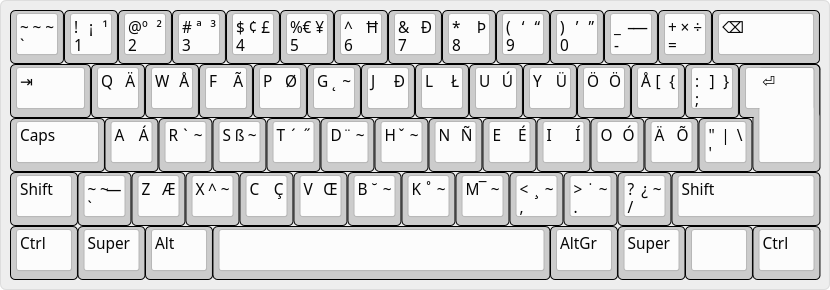
If you’re struggling to find the difference against normal Colemak, look at the cluster of five keys next to the return key.
This layout makes room for the three Swedish letters Å, Ä, and Ö, by only
changing five keys in total, and they have changed very thoughtfully:
- Square brackets, curly braces, pipe, and backslash have been lifted to the
AltGrlayer, but are still on the same keys as in ordinary Colemak. Nearly no relearning was required to adapt to that. - Semicolon, colon, apostrophe, and quote have moved to the right edge of the keyboard, but their unshifted/shifted relationship stays exactly as it is in ordinary Colemak. This took a few weeks to get used to, but overall not painful.
- That’s it! That frees up three keys for the special Swedish letters, and they are almost in the same positions a Swedish Qwerty user would expect. I thought this would take longer to learn, but I had learned it in a few days.
Some other notes on why I think this arrangement is a good idea:
- Swedish Qwerty users expect square brackets, curly braces, and backslashes on
the
AltGrlayer anyway. By aligning that expectation with their positions from Colemak, we get something that’s still more ergonomic than Swedish Qwerty.1 If you don’t know where the square brackets and curly braces are on a Swedish keyboard, don’t find out. Your hands will cramp just from looking at a picture of it. - The unshifted semicolon is useful in part if you use semicolons as statement
terminators, but also for Vim users who have mapped
;to:to avoid having to hold shift to enter ex commands. Surprisingly few Vim users do this, but they should. - The placement of the apostrophe/quote key actually makes the apostrophe land on the same key as it is on Swedish Qwerty, so that’s nice.
As far as I know, I’m the only user of this layout, but I honestly think it’s one of the better Swedish adaptations out there.
The only drawback of this method is that it drops the double and single
guillemets from the square bracket keys. That sucks if you’re French2 Or a
1930’s Swede., I suppose. If you find them useful, there’s plenty of extra
space in the AltGr layer to include them somewhere else.