Learning KeyBee

The problem with Qwerty keyboards on small touchscreen devices is that they are designed for ten-finger typing, and we typically only use two thumbs to type.1 This is why I’m not a proponent of alternatives like Colemak and Dvorak for small touchscreen devices. Such alternatise are even more strongly optimised for ten-finger typing, meaning they probably work even worse when used with only two thumbs. The separation of frequently used keys on the Qwerty keyboard probably actually helps ergonomics on small touchscreens. Surely there must be ways input can be optimised for two thumbs beyond the Qwerty keyboard.2 And I have surveyed some of them in the past.
Obviously, one of the best alternatives would be treating the touchscreen as a proper iambic morse code key. Unfortunately, no good implementation of that concept exists for Android.3 Oh you’ll find “Morse code keyboards” but they are never proper iambic keys with autorepeat and multi-touch or sliding for alternation. Of the choices that are available, the one that speaks to me the most is KeyBee.
At this point, I have used KeyBee for less than a human gestation period4 That’s nine months, for you metric users. and I can’t imagine going back to Qwerty. Learning a new input method is a couple of weeks of painful frustration, followed by another couple of weeks of slow going, but then after that everything goes automatically and you wonder why you didn’t do it before.
If you’re thinking of picking up an alternative input method for your small touchscreen, give KeyBee (or something else) a fair shot! Use it exclusively for at least a couple of weeks to get a good feel for what it is like when the initial frustration has worn off. It takes another month or two after that to earn proficiency without practice, but then it’s (probably) going to pay off in improved ergonomics for another decade or more.
Progress, quantitatively
Although ergonomics is the ultimate goal, not speed, the speed is easy to measure and can serve as a proxy. I tested my typing speed on a two-minute test once a day for the first month or so, and then occasionally after that. This is the progress. The grey line just above 40 wpm is my small touchscreen Qwerty speed, i.e. how fast I was able to type on Unexpected Keyboard on day zero.
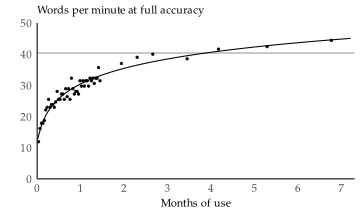
In the first two weeks, the progress was one wpm per day. The two weeks after that saw a progress of 0.25 wpm per day, and then after that it’s been down to 0.1 wpm per day.
When plotted against log-time, the improvement is a very straight line, meaning there’s no evidence of a speed ceiling yet. The smooth curve on the plot is based on this, and corresponds to
\[s = 7.7 \log{\left(t+0.1 \right)} + 30\]
where \(s\) is speed in wpm and \(t\) is time in months.5 The time is shifted by 0.1 months in part to avoid numeric problems with fitting time zero, but it also has a natural interpretation: 0.1 months is three days, and I had maybe a cumulative three days of practice with KeyBee previous years before I switched to it permanently this summer. The curve would predict that I can achieve 50 wpm with KeyBee later this year. That would be 25 % faster than Qwerty.
Progress, qualitatively
At this point, my KeyBee typing is already faster than Qwerty and feels more ergonomic. The one thing I miss from Unexpected Keyboard is a control key and explicit buttons for Swedish letters.
I also wrote down some other experiences from the learning process.
- The first week or so was frustrating as all hell. I wanted to throw my phone to the ground and punch a wall any time I needed to type anything.6 Which is strange. At that point I was nearly up to 20 wpm which is half the Qwerty speed I was used to. What did I get my panties up in a bunch over? I don’t know, there’s something about having to hunt for individual characters that really drives me crazy. Especially when I need to jot something down quickly. It makes a difference whether it takes 15 seconds or half a minute.
- Between days 4 and 9 I did some deliberate practice with keybr.com. That seems like a nice way to learn, but I stopped because I couldn’t take the time to do it. I was busy with summer things!
- The second week was also frustrating, but after about two weeks the frustration was gone. I could still tell I was slow, but I no longer had to painfully hunt for letters.
- After around 4 weeks, I tested one-thumb typing with both Qwerty and KeyBee. The one-thumb KeyBee speed was nearly the same as two-thumb, indicating my KeyBee was still limited by training and not dexterity. On the other hand, my one-thumb Qwerty was over 30 % slower than two-thumb Qwerty, indicating my Qwerty is significantly limited by dexterity.7 One-thumb Qwerty speed: 28 wpm. At the time, my one-thumb KeyBee speed was 24 wpm.
- I have re-attempted one-thumb typing on KeyBee a couple of times since then and I can achieve a few wpm over 30 with it, meaning I can now one-thumb KeyBee 10 % faster than I can one-thumb Qwerty, which I can type on with full accuracy with one thumb at 28 wpm. I think one of the easiest way I could improve my one-thumb KeyBee speed is by swiping terminal letters over to space. That’s a feature of KeyBee I haven’t properly learned to use, but swiping saves so much time I think I should learn it.
- The reason I stopped daily testing was that the app I used for it (which was quite neat) switched to a gross subscription model. Instant uninstall. I now test by typing stream of consciousness-style in Termux and counting each five characters as a word. I subtract a word for misspellings that aren’t corrected.
- I had used KeyBee for maybe a total of 90 minutes before this summer, but it was many years ago. If you start completely fresh, you may have a day where you are slower than I was on my first day. Don’t sweat it.
I would recommend giving KeyBee a shot. If you do, use it exclusively for at least two weeks before you write it off. But I also won’t look down on people who decide not to go for it.8 Unlike with alternative layouts for physical keyboards. They are such a no-brainer for anyone who reads this.
Alternatives to KeyBee
I started considering alternative input methods the minute I got my first touchscreen-only phone. For the past ten years, I have been on-and-off embarrassed that I still used Qwerty on small touchscreens. During that time, I’ve looked at various alternatives, and attempted using most of them at least briefly. I’ll again summarise why I went with KeyBee. Here’s what I could have done instead, and why I did not.
- Sticking to Qwerty. It’s not actually that bad for thumb-typing. (Which is also what makes it bad for ten-finger typing.) But I still feel like I will type enough on small touchscreens in the next decade that optimising ergonomics is a good decision.
- Using a prediction-based system, like swiping across a Qwerty keyboard or relying on autocorrect. These systems don’t work great with Swedish9 Although Swedish is not full-on agglutinative, it does make it easy to construct new compound words from other words and text prediction systems aren’t great with that. and worse, I find myself adjusting my language to make it easier on the machine, which I’m not comfortable with. To me, text and language is deeply personal and should not bend to any machine.
- Making my own iambic morse code key. That takes learning to program against Android, and Android apis change often enough that I’m not keen on that.
- Using a chorded input method like gkos. I did make a serious attempt with gkos and I really like the idea of chording. The gkos implementation allows for one-thumbed typing too, but I feel like gkos leans slightly too much on the accuracy side of the speed–accuracy tradeoff. Maybe when I’m old and imprecise I will revisit that assumption. MessageEase works very similar to gkos in one-thumb mode but does not have the two-thumb mode gkos has.
Preferences differ, but for me, KeyBee is one of those things that I put off for years because the initial frustration was too much to take, despite knowing that it only lasts a couple of weeks and then I feel silly for having put it off so long.